Dovetail Keys as a Timber Joint, ( Part 1)


More things to do with do with dovetails.

The project that I’m working on at the moment has twelve timber shelves as part of the design.

I was able to source a selection of recycled messmate and mountain ash in small dressed boards, which I decided to use for this part of the project
The shelves needed to be a 245mm wide and the board’s ranged in width from 40mm to 80mm, so a selection of boards had to be joined together to give me a panel as near to my 245mm width as required for the project.

In an ideal world I’d be able to reach for my domino and hey presto, I’d have the shelves joined; but sadly I don’t have a domino yet, so it’s back to the drawing board.

I have a full router table set up, so another possibility is to use was biscuits, but frankly, I don’t like them You may as well butt-join the pieces for all the additional strength that you’ll gain from them.

After a bit more thought, I settled on butt joining the pieces and then adding dovetail keys, both as a means to prevent the shelves from cupping, as well as a decorative feature.

Another advantage of this method was that I’d used sliding dovetails on the shelves and dividers in the carcasses of the wall unit, so I was very familiar with the required technique.

Once I’d cut all the timber to size and jointed all the edges, the shelves were glued, and butt joined together in lots of three with a couple of sheets of newspaper placed between each of the shelves to prevent them from sticking together. The glued units were then left for 24 hrs to cure.

Once cured the shelves were planed flat to remove any irregularities and sanded to 80 grit.

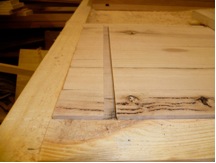
As there were 12 shelves to add dovetail keys to, I made a simple jig to speed up the process of routing the channels and to ensure continuity of dovetail placement on all the shelves. The jig is just a 3-sided frame, screwed to a sacrificial board with a straight edge attached to guide the router.

The position of the trench is determined by the placement of the straight edge, relative to the edge of the board. Remember to take into account the width of your router base when working out the correct position and double check that everything’s square before you screw the straight edge to the frame.

The next step is to run a straight trench through the shelves to remove the bulk of the excess timber and to minimise strain on the dovetail cutter. I used my Festool of 1010, fitted with a 6 mm spiral uncut but to perform this task.

It’s important not to avoid this step as the removal of the excess material from the trench allows the dovetail bit to perform much better and the bit is under much less strain.

The material I chose for the dovetail keys was 19mm Sydney blue gum that gave an excellent contrast against the messmate in the shelves. So that the keys were balanced in the shelves, I decided to set them in 6mm deep.

The next stage was to set the depth of the spiral cutter in the OF 1010 to 6mm and then cut the square trenches in the shelves.

Remember to check the position of your fence before you start cutting.

If your using two different routers, as I did, the fence will need to be moved into the correct position for the dovetail trenches after you’ve cut the straight trenches.

As in my previous article on sliding dovetails, I again turned to my trusty Bosch Gmr trimmer to cut the dovetail trenches.

With the tool unplugged insert the dovetail cutter into the Gmr and set the depth, so there is 6mm of cutter protruding.

The dovetail cutter depth must be the same as the depth of the straight trench that you cut previously.

Once the trimmer is all set then double check that your fence is in the correct position and cut all of the trenches. Clean up any feathered edges on them and put the shelves aside.
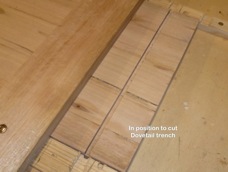


Make sure you don’t remove the dovetail cutter from the trimmer or adjust the depth.

The depth of the trench is the same as the height of the dovetail key we’re going to cut in part 2
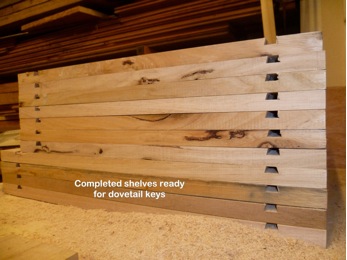
 

Part 2 of this article will cover how to make the dovetail keys.

As usual, your comments and questions are appreciated

Thanks for reading this article,

Bryan

How to get the most from your Rotex, (Part 2)

A Hard Burnished Wax Finish.

To protect and preserve the work, I usually apply a wax finish to the piece. I’m not a fan of varnish or lacquer style finishes as I feel they can give the finished piece a “plastic” sort of look when they’re completed.

The wax I use and recommend is Gilly Stephenson’s cabinetmakers wax. It is a combination of beeswax and carnauba wax in a gum turpentine base. From my own experience I’ve found that beeswax, on its own, never thoroughly dries and can become sticky and attract dust, and carnauba wax, on its own is tough to work with. The cabinet makers wax from Gilly Stephenson ticks all the boxes for me as it is easy to use, polishes up beautifully, and is very realistically priced.

The method I use to apply it is detailed below.

Sand your workpiece up to 1200 or 1500 grit using the method described in “How to get the most from your Rotex, (Part 1)
Put your sander aside but don’t remove the sanding disc
Use a soft cotton cloth and apply a thin coat of the wax to the surface. Rub it evenly over the surface making sure there are no lumps of wax. Remember to only use a thin layer. You can apply more coats as you go Once the wax has been spread over the surface leave it aside for about ten minutes.

Now, the next stage is the enjoyable part.

Grab your Rotex and double check that it’s on speed 1 as well as in Rotex mode. Place the sander on the workpiece, turn it on, and slowly and steadily work over the entire surface of your project. The small amount of heat that your creating is sufficient to open the pore of the timber and let the wax in, while the 1500 grit abrasive smooths and distributes the wax evenly over the surface.

Don’t overwork the surface: just a few minutes should do it.

When you’ve finished this stage you need to grab a paper napkin; yes, you read it right, a paper napkin. When I was teaching for Festool, and I knew I had a sanding workshop coming up the first thing I’d do would be to head down to the local McDonald’s and grab a handful of their paper napkins.
So, now you’ve got your napkin, place it on the workpiece, then put your Rotex, (with the 1500 grit abrasive still on it), on top of it. Double check that you’re in Rotex mode and on speed 1.
You should begin to see the shine develop very quickly. The paper towel equates to about a 6000grit, (approx) abrasive and cuts back the surface beautifully.
You can repeat the process and add as many layers of wax as you like. The more layers you have, the more vibrant and lustrous the finish but I recommend that you leave at least 24 hours between applications.
Try this finishing method on some offcuts of a few different species of timber. By doing this, you’ll create a “library” of finished samples which can really add the ‘wow’ factor to any presentations you give to potential commission clients if the future. What it also does is give you more practice with the sander so you can become more familiar with, and refine your technique on the sander.

I hope this article helps you in working with your Rotex and achieving better finishes that you’d previously thought possible. As always, please post a comment or send me an email if you’ve got any questions.

Cheers,
Bryan.

How to get the most from your Rotex, (Part 1)

How to get the most from your Rotex, (The Basics)

Okay, so you’ve done. You’ve bitten the bullet, spent the bucks, and now, sitting on the bench in front of you is possibly the best sander thus far to emerge from the melting pot that is European power tool engineering.

So; now what?

The first thing you probably want to do is whack a sheet of paper on it and sand a piece of wood until it’s paper thin. If you need to, go ahead, but make sure to clamp down your work first; there’s not much worse than being hit in that tender part of the anatomy by a piece of Rotex propelled timber.

Once you’ve got that out of your system, let’s start by having a good look at your new machine. Hopefully the salesman you purchased the sander from fully explained all the functions to you, but in case he didn’t, let’s start from scratch.

The Rotex 150 is a dual mode sander with an aggressive, gear driven mode, (Rotex mode) and a random orbital mode with a 5mm orbit.
You switch between these modes by pressing the green button on the top of the machine, down & to the left When the button.

is in the upright position the sander is in the Rotex mode.

To test this, make sure the power is turned off, then turn the base plate with your hand. You should feel some resistance and hear a “growl” coming from the sander. Now, push the top button down and to the left. This puts the sander into the random orbital mode. Turn the base plate again so you can feel and hear the difference between the two settings.

You’ve probably noticed the small green button on the right side of the Rotex just above the base plate. This is the spindle lock, and it’s used when we need to change the base plate because it’s either worn out or you need to switch to a pad of a different density for a specific application.
It’s a bit of a bugger to change, particularly the first time, but it will get easier to practice.
To use this function, first make sure the Rotex is unplugged, then put the sander into the Rotex mode.

Hold the sander upside down in your left hand so that your left thumb can depress the spindle lock button. Depress the spindle lock button with your left thumb and turn the pad anti-clockwise with your right hand until you feel the spindle lock engage, ( the spindle lock button will depress an extra couple of millimetres).

Continue holding the spindle lock and turning the pad anti-clockwise until the pad comes off.
To put on a new pad, depress the spindle lock, put the pad on the machine and turn it clockwise until you feel it drop into position and the locking mechanism begins to engage. Once this happens, grip it firmly and turn it clockwise until it locks. Now put the machine down and give your hands a shake. Told you it was a bit of s bugger to do; but trust me, it will get simpler with practice.

At the rear of the machine just above the plug it lead is the variable speed control for the sander and the green button on the inside rear of the “d” handle section releases the dust extractor port so you can polish the car without running the risk of it accidentally banging into the paint surface.

Using the Rotex.
Now, whatever your project, having a good understanding of how to use the functions of the sander will always help you to achieve the best finish possible on your work.

Rotex and Random Orbit Modes
One of the most common questions I field when showing people the Rotex is, “how do I know which mode, I should be using?”
Well, the simple answer to this is that you should always use both modes. Let me explain.

The Rotex mode will, with coarser papers, raise the grain while the random orbital mode cuts the grain back. From experience, I’ve found that if, for instance, you’re starting with 60 grit, whack it into Rotex mode and sand your work then stop, put the machine into the random orbit mode and sand it again. It’s important not to try to change from Rotex to random orbital mode while the tool is running; it’s like trying to change gears on your car without depressing the clutch.

Then change up a grit to 80 and repeat the process. As you progress through the grades, getting finer and finer, you’ll see the surface start to develop. It’s really important that you feel the wood with your hands as you’re sanding. Getting a good feel for the timber will help you gain a greater understanding of how a surface develops.
Continue sanding with 120, 180, 240, and 400 grit abrasives, being sure to repeat the Rotex, then random orbit modes

Sanding speeds

To achieve the best result results in your work, speed is another crucial factor to consider. The main things you have to remember are, the coarser the paper, the higher the speed.


Coarse paper on slow speed tends to dig in and ‘bite’ the work, which can lead to scratches and swirls that can be bloody hard to get out. Coarse paper on high speed tends to ‘skim’ over the work, and while it may take a little longer, you’ll achieve a more controlled result.
When you start sanding and are using, a 60 grit paper begin with the sander on speed 6 and use the Rotex, random orbit method as described above. As you start moving into progressively finer grades, gradually begin to lower the sander speed. Use the chart below as a rough guide for sander speed related to sanding grit.

Sanding grit. Speed
40. 6
60. 6
80. 6
120. 5
150. 5
180. 5
240. 4
320. 4
400. 3
500. 3
800. 2
1000. 2
1200. 1
1500 & finer 1

This chart is a suggested range only and results can vary depending on the type of timber that you choose.
The transition point when sanding is 400 grit. This is the stage where you stop sanding the timber and start burnishing it. From 400 up you’ll begin to see the surface of the wood develop and become smoother with every sanding stage that you complete. Don’t forget to feel the timber as you sand it so that you become more familiar with how each sanding grade contributes to the overall finish. Keep using the Rotex / random orbital sanding technique until you pass 1000 grit. From experience, I’ve found that when you reach 1200 grit switch to using the Rotex mode only. You should begin to see the timber surface begin to develop a lovely lustre and the surface will start to shine. This happens because the super fine grits that we have been using are burnishing the timber surface and closing the pore of the wood which gives us this glass-like finish.

That’s it for part 1 of this post, in part 2, I’ll go thru how to apply a burnished wax finish to your piece.

Cheers for now

Bryan

Blog at WordPress.com.

Up ↑